Skip the line and learn Minoan Crete. With pre-booked admission, you cut down on the waiting that comes with one of Greece’s most visited museums, and the included offline audio guide makes it easy to pace yourself while you read, listen, and move through the galleries. The one catch: at the entrance you may still hit long queues, and parts of the museum can be closed temporarily, so the audio route may not perfectly match what you see in those moments.
Before you go, you’ll want to set yourself up for smooth playback. This is handled through the Clio Muse Tours smartphone audio guide (Android and iOS), with offline text, narration, and maps—but you need to download the ticket and the tour while you’re on Wi‑Fi, since signal can be weak on-site. Bring your headphones and make sure your phone is fully charged.
In This Review
- Key highlights at a glance
- Why the Heraklion Archaeological Museum fits audio so well
- Ticket and app setup: do the prep before you arrive
- Download while you have Wi‑Fi
- Check the email (including spam)
- Bring what the audio needs
- Getting inside: what pre-booking changes (and what it doesn’t)
- What to plan for
- How the nearby location helps
- Stop 1: Inside the museum with the Clio Muse audio tour
- How the audio tour works in practice
- What you’ll likely experience (especially in busy rooms)
- If something is closed
- Making sense of Minoan artifacts in about two hours
- How to pace yourself
- What the “offline maps” do for you
- Timing and crowd management: your best moves at peak museum hours
- Before you hit the line
- After you get in
- Price and value: is $25.45 worth it?
- Who this experience suits best (and who might prefer a live guide)
- Should you book this audio-guided museum ticket?
- FAQ
- How long is the visit?
- What is included in the ticket?
- Do I need Wi‑Fi at the museum?
- Can I use my own headphones?
- What do I need to bring?
- How do I get the audio guide after booking?
- Is the Viator voucher my entry ticket?
- Will there still be a queue at the entrance?
- Is a live guide included?
- Can I get a refund if I cancel?
Key highlights at a glance

- Pre-booked museum ticket so you’re not hunting for entry on arrival
- Offline audio guide (text, narration, maps) for when Crete’s cell signal is iffy
- Self-paced visit for ~2 hours—you can pause when something catches your eye
- Smartphone-ready instructions via email with download steps (check spam too)
- Built to work without a live guide, but expect to navigate on your own
Why the Heraklion Archaeological Museum fits audio so well
The Heraklion Archaeological Museum is the kind of place where you’ll do better with options. You can move fast if you’re in scan-and-see mode, or slow down if you want to actually interpret what you’re looking at. That flexibility is exactly where a self-guided audio setup shines.
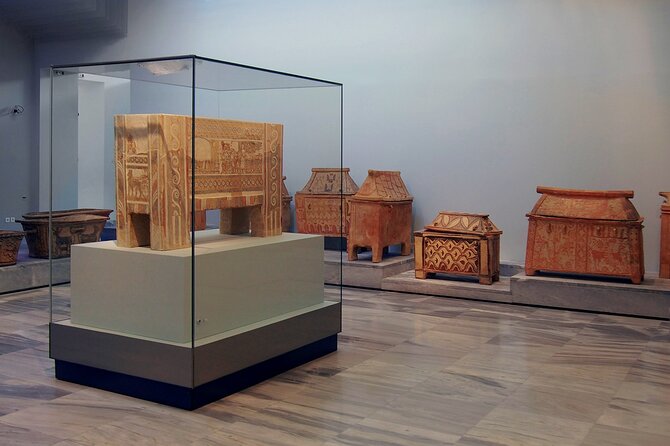
The museum’s collection is strongly tied to Crete’s Minoan world—artifacts collected from across the island, not just one palace site. That matters because the story hangs together better when you understand context. Instead of standing in front of objects that are hard to place, the audio guide gives you the kind of background that helps you connect the dots: what the object is, why it matters, and where it fits in the broader Minoan picture.
Two things I’d lean on right away:
- The tour focuses on selected artifacts, so you’re not forced into a rushed checklist.
- The guide is designed for your own pace, which is huge when galleries are crowded and your attention keeps getting interrupted.
Possible consideration: If you run into a temporary closure (some areas have been reported closed at times), the audio may not perfectly reflect the current layout. When that happens, your best move is to treat it like a guide to the themes—not a GPS that guarantees every room will match.
You can also read our reviews of more tours and experiences in Heraklion



Ticket and app setup: do the prep before you arrive
This experience is built around your smartphone, so the biggest “work” happens before you leave. Here’s the practical approach that avoids stress.
Download while you have Wi‑Fi
The instructions you receive by email tell you how to access and download both your ticket and your audio tour. Do that while you’re on Wi‑Fi before you head to the museum, because mobile signal may be weak at the site.
If you only half-prepare, it can turn into that annoying moment of standing in front of a museum door while you try to get playback working. I’d rather you avoid that entirely.
Check the email (including spam)
Confirmation is provided at booking, but the actual access steps come via email. Make sure you check your spam folder so you don’t miss the download link or instructions.
Bring what the audio needs
You’ll want:
- A fully charged phone
- Headphones (not included)
- The audio tour downloaded ahead of time
Also note: your Viator voucher is not the entry ticket. The entry is tied to the ticket you download and have ready for the museum.
You can also read our reviews of more guided tours in Heraklion





Getting inside: what pre-booking changes (and what it doesn’t)

Pre-booking is one of those small decisions that can pay off immediately. It can reduce the time you spend in line sorting out entry. Still, the museum is a major stop in Heraklion, and you might still face long queues at the entrance.
So I think of this ticket as “better odds,” not a guaranteed walk-in.
What to plan for
- Arrive with time to spare.
- Expect that the line situation can be slower than you hoped during peak hours.
- Keep your phone ready so you can move fast once you’re at the check point.
How the nearby location helps
The museum is near public transportation, so you can usually reach it without complicated logistics. That’s helpful because you can build your day around the museum rather than around transport timing.
Stop 1: Inside the museum with the Clio Muse audio tour
Your only stop is the Heraklion Archaeological Museum itself, but the experience has a “guided” feel without turning into a group tour.
How the audio tour works in practice
The tour is a self-guided smartphone audio experience delivered through the Clio Muse Tours app. It includes:
- Offline narration
- Offline text
- Museum maps
You can turn it on and off as you go, which is great if you want to reread a label, look closer at an artifact, or pause for photos. One of the strongest themes in the feedback around this format is the freedom to control the pace.
What you’ll likely experience (especially in busy rooms)
In a big museum, you’ll hit a rhythm: object → label → audio context → step to the next display. The audio helps you avoid the blank-stare problem—where you see something impressive but can’t confidently place it in the Minoan story.
The audio guide also tends to select artifacts with a focus on items that feel most useful for understanding the museum’s narrative. That’s good value if you want meaning, not just movement.
If something is closed
At times, parts of the museum upstairs have been reported closed temporarily. If you encounter that, don’t panic. You can still use the audio as a “theme guide,” and just follow what’s open. The key is to adjust your expectations: the audio may not reflect every temporary route change perfectly.
Making sense of Minoan artifacts in about two hours
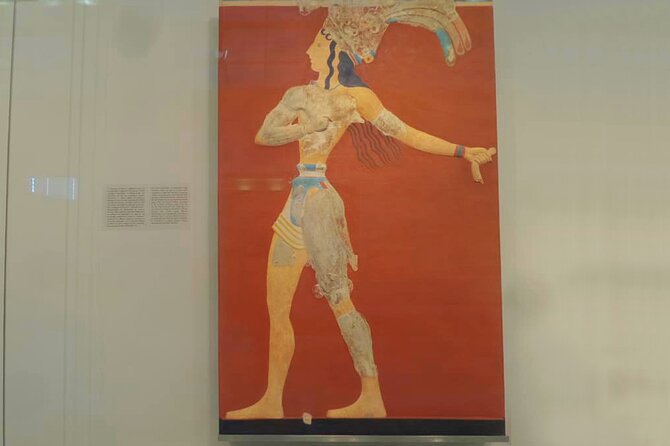
The duration is about 2 hours, and that’s a workable window if you follow a simple strategy: don’t try to see everything. Instead, let the tour’s selected artifacts give you the backbone of the museum.
How to pace yourself
Here’s a pacing approach that matches the tour’s design:
- Spend longer at displays that match the audio highlights.
- Pause if you need to read the label after the narration (that order often sticks in your head).
- Use the included maps to orient yourself before you move to the next set of galleries.
Two hours feels short on paper, but the museum is large, and your brain will get tired if you rush. The best way to use a self-guided audio tour is to treat it like a curated route you can interrupt, not a script you must finish.
What the “offline maps” do for you
Maps might sound minor, but they matter in a museum that’s easy to get turned around in—especially when you’re bouncing between rooms. Having offline maps on your phone keeps you from walking in circles with your screen dimming and your battery dropping.
Timing and crowd management: your best moves at peak museum hours
Even with pre-booking, the entrance can be slow. So the question isn’t just how to enter—it’s how to keep the visit enjoyable after entry.
Before you hit the line
- Keep your headphones in your bag and your phone charged.
- Have the downloaded ticket ready (not buried in an email thread).
- Double-check that the audio tour is already downloaded.
After you get in
Use the audio tour early. Starting right away helps you lock in context before you start seeing too many objects at once. If you wait, you can end up more distracted and less able to connect what you’re seeing.
If crowds are thick, focus on the audio-selected highlights first. You can always re-walk sections later if you still have energy—just don’t let “I should see everything” push you into a rushed ending.
Price and value: is $25.45 worth it?

At $25.45 per person, you’re paying for two main conveniences:
- Pre-booked entry, which saves time compared with sorting entry on arrival.
- An offline audio guide with maps, which upgrades your museum experience without needing a live guide.
The value comes from how much you’ll use the audio. If you’re the type who likes context—what you’re looking at and why it matters—this is a good fit. If you’re the type who only reads wall labels and wants silence, it might feel like extra.
A smart way to judge value: ask yourself how often you’ve walked out of museums thinking you didn’t really understand the objects. This audio guide is built to prevent that exact frustration, and the offline setup makes it practical even when the internet behaves badly.
Also consider the trade: you’re not paying for a guide who can flex to your questions. But you are getting a self-led format you can pause and control.
Who this experience suits best (and who might prefer a live guide)
This works especially well for:
- People who want freedom—turn the audio on and off, pause, and go at their own speed.
- Visitors who like a structured route without being “herded.”
- Travelers who won’t want to rely on constant data or Wi‑Fi.
It might be less ideal for:
- If you strongly prefer a live guide who can correct for temporary closures in real time.
- If you want a fully comprehensive walkthrough of every display, since the tour focuses on selected artifacts rather than scanning everything.
One detail from feedback that’s worth noting: older visitors or first-time museum-goers sometimes found it takes a moment to understand how to operate the app and follow the flow. Once it clicks, the experience tends to feel smooth.
Should you book this audio-guided museum ticket?
If you want a museum visit that’s organized but still yours, I’d say yes. This ticket is a solid value because it combines time-saving entry with an offline guide that helps you make sense of Minoan artifacts across Crete. And the self-paced format is perfect for when you’re tired, traveling with limited time, or just don’t want to march to someone else’s schedule.
I’d only hesitate if you’re expecting a perfectly updated audio route for every temporary closure. In that case, go in with a flexible mindset: let the audio guide the themes, and follow what’s open.
If you can do the basic prep—download on Wi‑Fi, bring headphones, and charge your phone—this is one of the easiest ways to get real value from the Heraklion Archaeological Museum.
FAQ
How long is the visit?
It’s listed at around 2 hours.
What is included in the ticket?
You get an adult entry ticket plus a self-guided audio tour on your smartphone (Android & iOS). The audio tour includes offline content such as text, narration, and maps.
Do I need Wi‑Fi at the museum?
The guide is designed to work offline. Still, you should download the ticket and the audio tour while you’re on Wi‑Fi before your visit, since mobile signal may be weak at the site.
Can I use my own headphones?
Headphones are not included, so you’ll need to bring your own if you want to listen.
What do I need to bring?
Bring your smartphone (and make sure it’s fully charged) plus your headphones. It also helps to download everything on Wi‑Fi before you go.
How do I get the audio guide after booking?
You receive an email with instructions for how to access and download your audio tour. Check your email spam folder if you don’t see it.
Is the Viator voucher my entry ticket?
No. The Viator Voucher is not your entry ticket—you’ll need the downloaded ticket/access provided for entry.
Will there still be a queue at the entrance?
There may still be long queues at the entrance, even with a pre-booked ticket.
Is a live guide included?
No live guide is included with this experience.
Can I get a refund if I cancel?
No. The experience is non-refundable and cannot be changed for any reason.
—
If you want, tell me your travel dates and whether you’re going right after the palace area—then I can suggest a simple timing plan so you use the 2 hours without feeling rushed.